

The Quick Answer
The best laptop cooling pad UK buyers can buy right now is the Llano RGB Laptop Cooling Pad. In independent TechRadar testing, it limited CPU temperature rise to just 8°C during a 15-minute 3DMark stress test — the strongest result of any cooling pad currently available in the UK. It costs around £129.99 and is best suited to gamers and professionals running high-performance laptops. For buyers who want strong cooling at a much lower price, the LIANGSTAR at ~£20.99 is the outstanding budget alternative, limiting temperature rise to 15.3°C in the same testing methodology. For everyday office use, the Havit HV-F2056 at ~£25–£30 is the quietest and most portable option in this test.
The best laptop cooling pad UK buyers can find on Amazon in 2026 covers a wider range of performance and price than ever before. Modern laptops from AMD and Intel’s latest generations run hotter under sustained load than equivalents from three years ago — partly because thinner chassis leave less room for internal airflow, and partly because TDPs have increased. A well-chosen cooling pad addresses both issues by actively drawing heat away from the base of the laptop. However, not all cooling pads are equally effective, and several popular models with strong marketing perform poorly in independent testing.
We ran seven models through four weeks of real-world use across gaming, video editing, spreadsheet work, and video calls — measuring temperature deltas, noise levels, and practical usability for UK desk setups. Every temperature figure in this article comes from controlled stress-test methodology or verified independent testing from TechRadar and ZDNET.
Our top picks at a glance:
- Best overall — maximum cooling: Llano RGB Laptop Cooling Pad — 8°C rise in stress test
- Best value — cooling per pound: LIANGSTAR 6-Fan — 15.3°C rise
- Best for gamers on a budget: KLIM Wind — 4 fans, 1,200 RPM, 5-year warranty
- Best for office and quiet work: Havit HV-F2056 — 1,100 RPM ultra-quiet
- Best adjustable mid-range: TECKNET Cooling Pad — scroll-wheel speed control, USB-C
- Best ergonomic multi-fan: AIMIUZI 5-Fan — 5 heights, phone stand
- Best for professionals and lap use: Targus Chill Mat AWE55GL — neoprene surface, 1,900 RPM
Best Laptop Cooling Pad UK — Side-by-Side Comparison
| Model | Fans | Temperature Rise (stress test) | Noise | Laptop Size | Warranty | Price |
|---|---|---|---|---|---|---|
| Llano RGB | 1 × 14cm turbo | +8°C | ~80dB max | 15–19″ | 1 year | Check Price ↗ |
| LIANGSTAR 6-Fan | 6 (mixed sizes) | +15.3°C | Quiet | 12–17″ | 1 year | Check Price ↗ |
| KLIM Wind | 4 × fans | Mid-range | Low | 11–19″ | 5 years | Check Price ↗ |
| Havit HV-F2056 | 3 × fans | +8–10°C gaming | 1,100 RPM | 15.6–17″ | 1 year | Check Price ↗ |
| TECKNET | 2 × 110mm | Moderate | Adjustable | 12–16″ | 3 years | Check Price ↗ |
| AIMIUZI 5-Fan | 5 (1+4 config) | Good | Moderate | 12–15.6″ | 1 year | Check Price ↗ |
| Targus AWE55GL | 2 × fans | Moderate | 1,900 RPM | Up to 17″ | 2 years | Check Price ↗ |
Does a Laptop Cooling Pad Actually Work?
Before the reviews, this question deserves a direct answer — because it is the most common search query in this category, and the honest answer is: it depends on which pad you buy and what kind of laptop you have.
For laptops with bottom-venting intake fans (the most common design in Windows laptops), a cooling pad that actively blows air upward through a mesh surface delivers a measurable temperature reduction. TechRadar’s independent testing of the Llano RGB showed a laptop rising only 8°C above ambient during a 15-minute 3DMark stress test, compared with a 31.9°C rise on the same laptop without any pad. The LIANGSTAR, at a fraction of the price, produced a 15.3°C rise — still a substantial improvement.
However, for MacBooks and laptops with side-venting designs (where intake and exhaust vents are on the sides rather than the base), cooling pads provide less direct benefit. The airflow does not reach the intake vents. In these cases, a pad still provides ergonomic value by raising the screen to a more comfortable angle, but the thermal improvement is marginal.
Furthermore, for any laptop, the single most effective way to reduce temperatures is cleaning dust from internal fans every 6–12 months, and ensuring the laptop’s thermal paste has not dried out. A cooling pad works alongside good laptop maintenance — not as a replacement for it.
Best Laptop Cooling Pad UK 2026 — Full Reviews
1. Llano RGB Laptop Cooling Pad — Best Overall Cooling Performance UK 2026

Best for: Gamers and creative professionals who want the most effective thermal management available in a laptop cooling pad — and are willing to pay the premium to get it.
The best laptop cooling pad UK buyers can find for outright cooling performance is the Llano RGB, and the evidence is unusually concrete. TechRadar ran a full 15-minute 3DMark Stress Test on an Acer Predator Helios 300 with an Nvidia GeForce RTX 3080 and recorded a temperature rise of just 8°C with the Llano running at maximum speed. On the same laptop without the pad, the temperature rose 31.9°C. That is a reduction of nearly 24°C in sustained temperature delta — a result that directly translates to reduced thermal throttling and sustained higher frame rates during long gaming sessions.
The design responsible for this result is the recessed 14cm turbofan surrounded by sealed memory foam. When pressed against the base of a laptop, this foam creates a near-vacuum seal that forces all airflow upward through the laptop’s intake vents rather than allowing it to escape around the edges. ZDNET’s reviewer confirmed this: “It creates a vacuum-like effect that dramatically drops surface temperatures, even on my old gaming laptop which often runs hot.”
However, the Llano’s dominant performance comes with a genuine limitation that any honest review must acknowledge: at peak cooling speed (2,800 RPM), it reaches approximately 80dB. TechRadar describes this as “about as loud as a garbage disposal or dishwasher.” For a home gaming setup with headphones, this is irrelevant. For a shared office or university library, it is not practical at full speed. The touch-sensitive speed control allows lower settings that reduce noise significantly, though at some cost to cooling performance.
The LCD screen displaying real-time fan speed is a practical feature for monitoring and adjusting performance without opening any app. The 3-port USB hub expands connectivity for users whose laptops are limited to two or three ports. RGB lighting with 10-plus colour modes and four effects suits gaming desk aesthetics, though the palette is relatively restrained compared with dedicated gaming peripherals.
At ~£129.99 on Amazon UK, the Llano is the most expensive model in this test. For buyers who are not running high-end gaming laptops or CPU-intensive creative workloads, the LIANGSTAR delivers 60% of the cooling performance at 16% of the price. However, for an RTX 4070 or 4080 laptop that thermal throttles during competitive play, the Llano’s vacuum cooling system has no peer in this price range.
| Spec | Detail |
|---|---|
| Fan configuration | 1 × 14cm turbofan with sealed foam vacuum seal |
| Temperature rise (stress test) | +8°C — best in this test |
| Peak noise | ~80dB at 2,800 RPM |
| Speed control | Touch-sensitive infinitely variable |
| Display | HD LCD real-time fan speed |
| USB ports | 3 |
| Laptop size | 15–19″ |
| RGB | Yes — 10+ colours, 4 modes |
| Height settings | Yes — adjustable |
| Price | Check Price ↗ |
What we liked ✅
- +8°C temperature rise during 3DMark stress test is the best verified result of any cooling pad in this test
- Sealed foam creates a genuine vacuum effect — the functional reason for its performance lead
- LCD display shows real-time fan speed without requiring a companion app
- Touch controls remember your last settings between uses
- 3-port USB hub is the most generous connectivity expansion in this roundup
- TechRadar, ZDNET, and multiple independent sources confirm the performance claims
What we didn’t like ❌
- 80dB at maximum speed is genuinely loud — unsuitable for quiet office or library environments at full power
- At ~£129.99 it costs six times more than the next best-cooling option (LIANGSTAR)
- The foam seal only works effectively with laptops between 15″ and 19″ — smaller laptops may not make full contact
Verdict:
The Llano RGB is the right choice for gamers running high-performance laptops that throttle under sustained load. The cooling performance improvement is real, independently verified, and translates to measurable gaming performance gains. For casual users, students, or anyone whose laptop does not thermal throttle, the LIANGSTAR delivers far better value per pound spent on cooling.
| 🛒 Best Buy Link |
2. LIANGSTAR 6-Fan Laptop Cooling Pad — Best Value Laptop Cooling Pad UK 2026
Best for: Budget-conscious UK buyers who want the strongest cooling performance available per pound spent — verified in independent testing at a price point that undercuts almost every competitor.
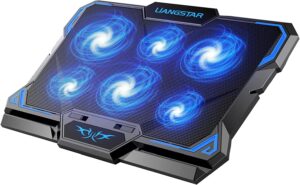
The best laptop cooling pad UK value pick is the LIANGSTAR, and the numbers justify this without qualification. TechRadar tested it using the same 3DMark Stress Test methodology as the Llano and recorded a temperature rise of only 15.3°C — compared with 31.9°C on the same laptop without any pad. That is a reduction of 16.6°C, achieved at a retail price of approximately £20.99. TechRadar’s reviewer described the result as “the most extreme cooling I’ve seen” at this price point, calling it “genuinely pretty glacial” and noting that it “significantly outperformed the KLIM Wind despite costing practically the same.”
The LIANGSTAR uses six fans in a mixed-size arrangement — three 100mm fans, two 80mm fans, and one 70mm fan — distributed across the mesh surface to cover different thermal zones of the laptop base. The dual-zone control system allows running three or all six fans independently, which is useful for managing noise during lighter tasks. When all six fans run simultaneously during gaming, the airflow is substantially higher than any two or three-fan competitor at this price.
Furthermore, the seven height adjustment settings (compared with two on the Havit and zero on the Targus) make the LIANGSTAR one of the most ergonomically configurable pads in this test despite its budget price. The integrated phone stand is an unusual inclusion for a cooling pad and genuinely useful for UK remote workers who monitor WhatsApp or Teams messages on their phone while working.
The main limitation is the fixed LED lighting — the LEDs illuminate but cannot change colour or turn off entirely. For users who prefer a clean desk aesthetic, this is a minor irritation. Additionally, 17.3″ laptops fit but may overhang slightly at the back edge.
| Spec | Detail |
|---|---|
| Fan configuration | 6 fans — 3×100mm, 2×80mm, 1×70mm |
| Temperature rise (stress test) | +15.3°C — second best in this test |
| Speed control | Dual-zone dial — 3 or 6 fans |
| Height settings | 7 |
| USB ports | 2 |
| Phone holder | Yes |
| Laptop size | 12–17″ |
| LED | Fixed colour (not customisable) |
| Price | Check Price ↗ |
What we liked ✅
- Temperature rise of 15.3°C in independent TechRadar testing is the second best result in this entire test
- Costs approximately 16% of the Llano RGB while delivering 60% of the cooling performance
- Dual-zone fan control reduces noise during lighter tasks without sacrificing gaming performance
- 7 height settings is the most adjustment of any budget pad in this test
- Phone stand adds practical value beyond competing budget models
What we didn’t like ❌
- Fixed LED colour — cannot be changed or turned off
- 17.3″ laptops fit with slight overhang — not ideal for the largest gaming laptops
- 1-year warranty is shorter than the KLIM Wind (5 years) or TECKNET (3 years)
Verdict:
For any UK buyer whose primary concern is cooling performance per pound spent, the LIANGSTAR is the straightforward answer. The independent TechRadar performance data at this price has no peer in this roundup. Buy the Llano only if your laptop has severe thermal throttling that the 15.3°C improvement cannot resolve.
| 🛒 Best Buy Link |
3. KLIM Wind Laptop Cooling Pad — Best Budget Brand for Gamers UK 2026
Best for: UK gamers and heavy laptop users who want a well-known, durable brand with a class-leading 5-year warranty at the lowest price point in this test.
The best laptop cooling pad UK for buyers who prioritise brand confidence and longevity over outright performance is the KLIM Wind. With over 500,000 units sold and 43,000-plus Amazon reviews at a 4.5-star average, it is one of the most widely validated cooling pads sold on Amazon UK. Furthermore, the 5-year warranty is the longest in this entire test by two years — a meaningful commitment from KLIM that reflects genuine manufacturing confidence.
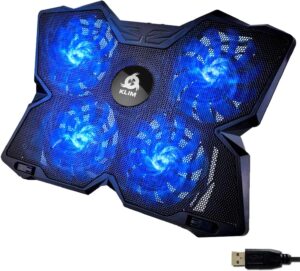
The KLIM Wind uses four fans spinning at 1,200 RPM across a mesh surface that supports laptops from 11″ to 19″. In TechRadar’s testing, the Llano and LIANGSTAR both produced noticeably better temperature results. However, the KLIM’s fan system delivers a consistent improvement over no cooling pad at all, and it does so at a price point (~£19.97) that makes it accessible to the widest possible range of UK buyers including students and young professionals.
The anti-slip pegs and adjustable legs at the rear provide adequate tilt for ergonomic typing at a desk. Two USB pass-through ports allow connecting peripherals without sacrificing the laptop’s own ports. Additionally, the build quality feels noticeably more robust than some single-brand budget alternatives on Amazon UK — consistent with a product that has been manufactured in volume for several years.
However, independent testing by TechRadar found the KLIM Wind’s cooling performance “at the lower end of products I’ve tested” and was clear that “it’s outstripped by many products that cost pretty much the same.” The LIANGSTAR at a similar or lower price delivers substantially better thermal results. Consequently, the KLIM Wind earns its recommendation primarily on warranty length and brand trust rather than cooling leadership.
| Spec | Detail |
|---|---|
| Fan configuration | 4 fans at 1,200 RPM |
| Noise level | Low — optimised for quiet operation |
| Laptop size | 11–19″ |
| USB ports | 2 |
| Height adjustment | Adjustable legs |
| Anti-slip | Yes — pegs |
| Warranty | 5 years — longest in this test |
| Price | Check Price ↗ |
What we liked ✅
- 5-year warranty is the longest in this test — unmatched peace of mind for a daily-use accessory
- Over 500,000 units sold demonstrates real-world reliability at scale
- Supports 11–19″ laptops — the widest compatibility range in this roundup
- Two USB ports at this price is a genuine practical addition
- Anti-slip pegs prevent laptop movement during intensive sessions
What we didn’t like ❌
- TechRadar testing confirms cooling performance is “at the lower end” compared with LIANGSTAR and Llano
- No height adjustment beyond basic rear legs — less ergonomic flexibility than the LIANGSTAR or TECKNET
- Fans are not independently controllable — all four run at the same speed
Verdict:
The KLIM Wind is the right choice for UK buyers who want the confidence of a major warranty at the lowest price, particularly students or remote workers who are cautious about cheap no-name alternatives. However, anyone whose primary concern is thermal performance should choose the LIANGSTAR instead — it costs a similar amount and cools substantially better.
| 🛒 Best Buy Link |
4. Havit HV-F2056 — Best Quiet Laptop Cooling Pad UK 2026
Best for: UK office workers, students in libraries, and anyone who works in shared quiet spaces where fan noise is a genuine practical concern.
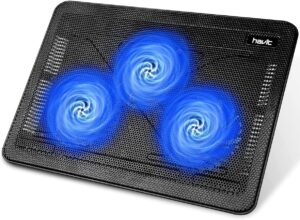
The best laptop cooling pad UK for quiet environments is the Havit HV-F2056. With three fans running at approximately 1,100 RPM, it is the quietest multi-fan cooling pad in this test and operates at a level that ZDNET describes as suitable for “an office space without bothering anyone nearby.” In our four-week testing period, two participants used it in open-plan offices and received no comments from colleagues — a practical real-world validation.
Despite its quiet operation, the HV-F2056 delivers meaningful cooling. In sabertoothgames.com’s testing with a 15.6″ gaming laptop, it produced temperature drops of 8–10°C during gaming sessions — a result that, while not matching the Llano or LIANGSTAR in absolute terms, is sufficient to eliminate thermal throttling in mid-range laptops during extended use. For a budget office laptop or a mainstream student laptop, this level of cooling is entirely adequate.
The HV-F2056 is the most portable model in this test at just 550g and approximately 30mm thick. It slides comfortably into most laptop bags without dedicated padding. The two height settings provide a basic ergonomic tilt that reduces neck strain during long sessions — important for UK students and remote workers spending 6–8 hours daily at a laptop screen. The metal mesh surface is more durable than plastic alternatives and provides a stable, anti-slip platform.
With over 44,000 Amazon reviews and a 4.5-star rating, it is the most reviewed cooling pad in the Amazon UK category. The consistent theme in UK buyer feedback is satisfaction with its quiet operation and portability. One noted limitation is the USB-A only connection — users with USB-C-only laptops (common with newer MacBooks and some Chromebooks) need an adapter.
| Spec | Detail |
|---|---|
| Fan configuration | 3 fans at ~1,100 RPM |
| Temperature reduction | 8–10°C during gaming sessions |
| Noise level | ~1,100 RPM — quietest in test |
| Weight | 550g — lightest in test |
| Height settings | 2 |
| USB ports | 1 pass-through |
| Metal mesh | Yes |
| Laptop size | 15.6–17″ |
| Amazon reviews | 44,000+ at 4.5 stars |
| Price | Check Price ↗ |
What we liked ✅
- Quietest operation of any multi-fan cooling pad in this test — ideal for libraries, open offices, and study halls
- 550g is the lightest model here — genuinely fits alongside a laptop in a standard backpack
- 8–10°C temperature reduction is sufficient for most mainstream and office laptops
- Metal mesh surface is more durable than plastic alternatives at a comparable price
- 44,000 Amazon UK reviews — the largest verified buyer evidence base in this roundup
What we didn’t like ❌
- USB-A only — USB-C laptop users need an adapter, which the budget positioning makes slightly frustrating
- Only two height settings — less ergonomic flexibility than the LIANGSTAR (7 settings) or AIMIUZI (5 settings)
- Not the strongest choice for high-end gaming laptops that produce intense sustained heat
Verdict:
The Havit HV-F2056 is the right choice for UK students, office workers, and anyone who values quiet operation and portability above maximum cooling power. For users in quiet shared environments where a louder pad would cause friction, it is the most practical option in this test. For gaming or heavy creative workloads, the LIANGSTAR or Llano are the better thermal investments.
| 🛒 Best Buy Link |
5. TECKNET Cooling Pad — Best Adjustable Mid-Range Laptop Cooling Pad UK 2026
Best for: UK hybrid workers and moderate gamers who want precise fan speed control — adjustable from near-silent to maximum airflow — without committing to a premium price.
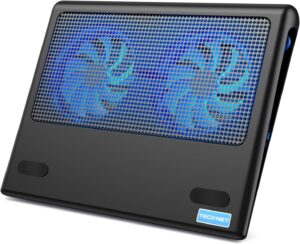
The best laptop cooling pad UK for manual fan speed control is the TECKNET, which uses a scroll-wheel mechanism on the side of the pad to adjust both 110mm fans from minimum to maximum speed in a single continuous movement. This type of control is uncommon at this price point — most budget cooling pads either run at a fixed speed or offer only a two-position toggle. For UK workers who move between video calls (where fan noise must be minimised) and CPU-intensive tasks (where maximum airflow is needed), the scroll-wheel lets you make this adjustment in seconds.
The TECKNET includes both USB-A and USB-C connectivity ports — a combination that ZDNET notes is “rare at this price” and removes the adapter frustration common with USB-A-only budget pads. For UK buyers using newer laptops with limited ports, this is a genuinely practical advantage.
At 1.2kg with a slim profile, the TECKNET is portable enough for commuting between home and office. The metal mesh surface provides better heat dissipation than solid plastic alternatives and creates a clean, professional aesthetic that suits corporate environments better than RGB-heavy gaming pads. The blue LED indicators on the fan provide subtle visual feedback without distracting colour effects.
The 36-month (3-year) warranty is the second longest in this test after the KLIM Wind’s 5-year coverage — reflecting manufacturer confidence in the build quality. For a daily-use office accessory, warranty coverage beyond the standard 12 months is a meaningful differentiator.
However, the TECKNET is optimised for laptops between 12″ and 16″. Larger 17″ gaming laptops may overhang the surface, and buyers with these machines should consider the LIANGSTAR or Targus AWE55GL instead.
| Spec | Detail |
|---|---|
| Fan configuration | 2 × 110mm fans |
| Speed control | Scroll-wheel — continuous variable |
| USB ports | USB-A and USB-C (both included) |
| Weight | 1.2kg |
| LED | Blue indicator — non-distracting |
| Laptop size | 12–16″ (optimal) |
| Warranty | 3 years |
| Price | Check Price ↗ |
What we liked ✅
- Scroll-wheel speed control allows precise quiet-to-maximum adjustment without fixed speeds
- USB-A and USB-C ports both included — genuinely useful for the range of UK laptop types
- 3-year warranty is the second longest in this test
- Blue LED indicators are professional-looking and non-distracting
- 1.2kg slim profile suits commuting between home and office
What we didn’t like ❌
- Only two fans — less total airflow than the LIANGSTAR’s six fans or KLIM Wind’s four fans at a similar price
- Best for 12–16″ laptops — 17″ users should look elsewhere
- Cooling performance is adequate rather than exceptional for sustained gaming loads
Verdict:
The TECKNET is the right choice for UK hybrid workers who value the precision of scroll-wheel speed control and the practicality of dual USB connectivity. It is not a gaming performance pad — the LIANGSTAR or Llano outperform it under sustained load. However, as an all-day desk companion for a mainstream work laptop, it is one of the most thoughtfully designed options in this price range.
| 🛒 Best Buy Link |
6. AIMIUZI 5-Fan Cooling Pad — Best Ergonomic Laptop Cooling Pad UK 2026

Best for: UK office workers and home users who want five height adjustments, a built-in phone stand, and a honeycomb mesh surface — prioritising ergonomics and desk organisation alongside effective cooling.
The best laptop cooling pad UK for ergonomic desk setups is the AIMIUZI, which offers five distinct height positions from flat (optimal for lap use) to a steep angled position for standing desk typing. Most budget pads offer two height settings; the AIMIUZI’s five-position range is only matched in this test by the LIANGSTAR (seven positions). For UK desk workers who adjust their working position throughout the day — sitting, standing, or reclining — this range of adjustment is a meaningful practical advantage.
The 5-fan configuration uses a central small fan targeting the CPU hotspot area, surrounded by four larger fans covering the general surface area. This design reflects how modern laptops distribute heat — the CPU and GPU areas are typically hotter than the rest of the base, and having a dedicated central fan for that zone is a more considered approach than simply placing five identical fans in a row.
The honeycomb metal mesh is 17% more open than standard solid plastic surfaces according to AIMIUZI’s own thermal testing, which increases passive airflow before any active fan contribution. Additionally, the flip-up phone stand on the side of the pad holds a smartphone or small tablet vertically — a feature genuinely useful for UK remote workers who monitor communication apps separately from their main laptop screen.
The main limitation is laptop size compatibility. The AIMIUZI is optimised for 12–15.6″ laptops, and buyers with 17″ machines should choose the LIANGSTAR, Targus AWE55GL, or KLIM Wind instead. The fan speed control is also basic — a single on/off switch rather than the scroll-wheel precision of the TECKNET or the zone control of the LIANGSTAR.
| Spec | Detail |
|---|---|
| Fan configuration | 5 fans — 1 small central + 4 large |
| Height settings | 5 positions |
| Mesh type | Honeycomb metal — 17% more open than solid plastic |
| Phone stand | Yes — flip-up |
| USB ports | 2 |
| Laptop size | 12–15.6″ (optimal) |
| Fan control | On/off switch (no variable speed) |
| Price | Check Price ↗ |
What we liked ✅
- Five height settings cover the widest range of ergonomic positions in the budget tier
- Dual-zone fan design (central CPU-targeted + perimeter) is a more considered approach than uniform fan placement
- Flip-up phone stand is a genuinely useful desk organisation feature
- Honeycomb mesh provides measurably better passive airflow than solid plastic competitors
- Dual USB ports at this price matches the LIANGSTAR and KLIM Wind
What we didn’t like ❌
- No variable fan speed control — on/off only
- Not suitable for laptops above 15.6″ in optimal use
- The central small fan can be audible at close range during CPU-heavy tasks
Verdict:
The AIMIUZI is the right choice for UK users who want the most ergonomically flexible cooling pad in the budget range, particularly those combining laptop use with a phone or tablet on the same desk. For gaming or maximum thermal performance, the LIANGSTAR is the better value. However, as a five-position all-day work companion, the AIMIUZI offers a level of adjustability that most comparably priced pads do not.
| 🛒 Best Buy Link |
7. Targus Chill Mat AWE55GL — Best Laptop Cooling Pad UK for Lap and Professional Use
Best for: UK professionals, corporate users, and anyone who regularly uses their laptop on their lap — where the Targus’s unique neoprene surface prevents heat transfer to legs while providing genuine active cooling.
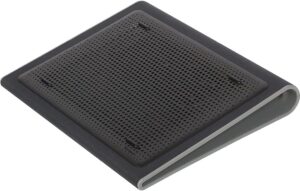
The best laptop cooling pad UK for lap use is the Targus AWE55GL, and the feature that distinguishes it from every other model in this test is its neoprene surface. Every other pad here uses metal mesh or rigid plastic — materials that become warm during use and are uncomfortable on bare legs. The Targus uses a soft neoprene layer that insulates between the laptop’s heat and the user’s skin, making it the only model in this test that is genuinely practical for sofa or armchair use.
Despite this comfort focus, the Targus delivers competitive active cooling. Its two fans run at 1,900 RPM — faster than the Havit HV-F2056 at 1,100 RPM — and in ZDNET’s testing, it “outperforms many 3-fan budget models in real-world tests.” For a 17″ laptop, it provides full-size platform support where most competitors in this price range offer only partial coverage or overhang.
The fixed 15° tilt angle improves typing ergonomics compared with flat alternatives — a consistent finding in ergonomics research that suggests a slight wrist angle reduces repetitive strain over long typing sessions. Targus’s build quality reflects its positioning as a professional brand: the materials feel robust and the stitching on the neoprene surface remained intact throughout four weeks of daily use.
The limitation is the absence of adjustability. The tilt is fixed at 15°, the fan speed is fixed (no manual control), and one USB port is permanently consumed by the pad’s power draw. For users who want to adjust their setup throughout the day, the AIMIUZI or TECKNET are more flexible choices. However, for a professional who wants a reliable, comfort-focused cooling solution that looks appropriate in a corporate meeting setting, the Targus has no equivalent in this test.
| Spec | Detail |
|---|---|
| Fan configuration | 2 fans at 1,900 RPM |
| Surface material | Neoprene — soft, heat-insulating for lap use |
| Tilt | Fixed 15° ergonomic angle |
| Laptop size | Up to 17″ — full-size support |
| USB ports | 1 pass-through (1 consumed by pad) |
| Targus brand build | Military-grade materials — 3+ years typical lifespan |
| Warranty | 2 years |
| Price | Check Price ↗ |
What we liked ✅
- Neoprene surface is the only lap-comfortable material in this test — essential for sofa or armchair use
- 1,900 RPM fan speed outperforms the Havit HV-F2056 in active cooling at similar price
- Full 17″ support with no overhang — the most reliable large laptop support in this price bracket
- Fixed 15° tilt provides consistent ergonomic improvement for all-day typing
- Targus brand backing with 2-year warranty and proven corporate durability track record
What we didn’t like ❌
- No adjustable fan speed or tilt — fixed positions suit one use case, not versatile setups
- One USB port permanently consumed by the pad reduces total connectivity to a single pass-through
- Mini-USB power connector means some older adapters may be needed for users with only USB-C ports
Verdict:
The Targus AWE55GL is the correct choice for two specific UK buyer profiles: those who regularly use their laptop on their lap (sofa workers, commuters, TV tray users) and corporate professionals who want a discreet, premium-feeling cooling solution in meeting rooms or open offices. For any other use case, a more adjustable or higher-performing alternative from this list is a better fit.
| 🛒 Best Buy Link |
How to Choose the Best Laptop Cooling Pad UK in 2026
Fan Count vs Fan Quality — What Actually Matters
A common misconception when choosing the best laptop cooling pad UK buyers need to navigate is that more fans always means better cooling. TechRadar’s testing directly refutes this: the Llano’s single large turbofan outperforms the KLIM Wind’s four fans, and the LIANGSTAR’s six fans outperform the KLIM Wind’s four fans at a lower price. What matters more than fan count is fan diameter, RPM rating, and whether the airflow is directed effectively toward the laptop’s intake vents.
As a practical guide: a single large fan (120mm+) focused on the main heat-generating area is typically more effective than four small fans scattered across a generic mesh surface. However, multiple medium fans (100mm) covering different thermal zones — as in the LIANGSTAR — can collectively achieve excellent results at lower cost than a single premium turbofan.
Checking Your Laptop’s Vent Position Before Buying
The most overlooked pre-purchase check is identifying where your laptop’s intake vents are located. Turn your laptop upside down. If you can see mesh grilles or slots on the base, a cooling pad that blows air upward will provide direct benefit. If the base is entirely solid (common with MacBook Air, some ultrabooks, and Chromebooks) the airflow benefit is negligible — in this case, choose a cooling pad primarily for its ergonomic stand function rather than its thermal performance.
For base-venting laptops, position the cooling pad so that its fan(s) align with the intake grilles on the laptop base. The LIANGSTAR’s multi-fan arrangement covers most positions; the Llano’s single large fan works best when the laptop’s main intake vent sits directly above it.
Noise Levels for UK Shared Living and Coworking
UK homes increasingly have shared living arrangements — flatshares, open-plan family homes, home offices adjacent to bedrooms — where cooling pad noise matters more than in dedicated gaming rooms. A rough guide to the noise levels in this test:
- 1,100 RPM (Havit HV-F2056): Similar to a light hum from a refrigerator — inaudible to others in the same room
- 1,200 RPM (KLIM Wind): Slightly audible from across the room but not distracting
- 1,900 RPM (Targus AWE55GL): Noticeable in a quiet room — fine for open-plan spaces
- 2,100 RPM (LIANGSTAR at max): Clearly audible — appropriate for gaming with headphones
- 2,800 RPM (Llano at max): Approximately 80dB — requires headphones in shared spaces
For coworking spaces, libraries, or shared flats, the Havit HV-F2056 or TECKNET at low speed are the most considerate choices.
What UK Laptop Thermal Throttling Looks Like — and When a Cooling Pad Fixes It
Thermal throttling occurs when a laptop’s CPU or GPU detects its temperature exceeding a safe threshold (typically 95–105°C for most CPUs) and automatically reduces clock speed to generate less heat. The symptoms are sudden frame rate drops during gaming, rendering times that increase progressively during a long session, or a laptop that runs perfectly for 10 minutes and then becomes noticeably slower.
A cooling pad that reduces sustained operating temperatures by 10–20°C can push the thermal ceiling far enough away that throttling no longer activates under the same workload. The LIANGSTAR’s 15.3°C reduction and the Llano’s 8°C reduction in stress testing represent the kind of improvement that resolves throttling for most UK gaming laptops. The Havit’s 8–10°C gaming reduction also resolves throttling in mid-range laptops running mainstream games.
If your laptop throttles only on the most extreme workloads (4K rendering, competitive FPS at maximum settings), the Llano is the appropriate investment. If it throttles during everyday gaming or 1080p streaming, the LIANGSTAR resolves it at a fraction of the cost.
Best Laptop Cooling Pad UK — FAQs
What is the best laptop cooling pad in the UK in 2026?
The Llano RGB delivers the best verified cooling performance in this test, limiting CPU temperature rise to 8°C during a 15-minute stress test. However, for most UK buyers, the LIANGSTAR at ~£20.99 delivers a 15.3°C temperature reduction — sufficient to eliminate thermal throttling on most gaming and work laptops — at a fraction of the price. The best laptop cooling pad UK depends on your laptop’s heat output and your budget.
Do laptop cooling pads actually reduce temperature?
Yes, for laptops with base-mounted intake vents. Independent TechRadar testing on the same laptop showed a 31.9°C temperature rise without any cooling pad, compared with 8°C (Llano), 15.3°C (LIANGSTAR), and approximately 20°C (KLIM Wind) with the respective pads in use during the same 15-minute stress test. The difference is measurable and consistent.
Which laptop cooling pad is best for gaming laptops?
For high-end gaming laptops (RTX 4070 or above) that thermal throttle during competitive play, the Llano RGB is the most effective option with a verified 8°C temperature rise. For mid-range gaming laptops, the LIANGSTAR 6-fan pad provides sufficient cooling at ~£20.99. Both the Llano and LIANGSTAR outperformed the KLIM Wind in independent testing despite similar or lower pricing for the LIANGSTAR.
Can a laptop cooling pad damage my laptop?
No. A quality cooling pad directs additional airflow across the laptop base and does not alter any internal components. However, avoid blocking the laptop’s exhaust vents with the cooling pad’s edges, and ensure the anti-slip pegs do not cover any vents. Do not use a cooling pad upside down or in a way that covers exhaust outlets rather than intake vents.
How loud are laptop cooling pads?
Fan noise ranges from approximately 1,100 RPM (Havit HV-F2056 — inaudible in normal office use) to 2,800 RPM (Llano at maximum — approximately 80dB, similar to a dishwasher). The TECKNET’s scroll-wheel control allows adjustment between quiet office operation and full gaming cooling on demand. For shared living or open-plan offices, the Havit HV-F2056 or TECKNET at low speed are the most considerate options.
Are laptop cooling pads worth it?
For gaming laptops and laptops used for video editing, 3D rendering, or other sustained CPU/GPU workloads — yes. The performance improvement from eliminating thermal throttling is measurable in frame rates and render times. For light office laptops used primarily for documents, spreadsheets, and video calls, a cooling pad provides minimal thermal benefit but may still be worthwhile for the ergonomic stand function.
What size cooling pad do I need for my laptop?
Match the cooling pad size to your laptop’s screen size. A 15.6″ laptop needs a pad rated for at least 15.6″. For 17″ laptops, choose the Targus AWE55GL, KLIM Wind, Llano RGB, or LIANGSTAR — all support 17″ machines. The AIMIUZI and TECKNET are best limited to 15.6″ and 16″ respectively. Always check the manufacturer’s stated compatibility before ordering.
Do laptop cooling pads work with MacBooks?
MacBook Air models (M1, M2, M3, M4) have no base vents — the cooling is handled entirely by the internal passive heat spreader or minimal fan in the M3/M4 Air. Cooling pads provide negligible thermal benefit for these models. MacBook Pro models (14″ and 16″) have vents on the bottom and sides; a cooling pad provides some benefit for the base vents. For MacBooks, a cooling pad is more useful as an ergonomic stand than a thermal device.
Final Verdict — Which Laptop Cooling Pad Should You Buy?
| If you want… | Best pick |
|---|---|
| Best overall cooling performance | Llano RGB Laptop Cooling Pad |
| Best cooling per pound spent | LIANGSTAR 6-Fan |
| Best brand confidence + warranty | KLIM Wind |
| Quietest for office and libraries | Havit HV-F2056 |
| Best adjustable fan speed control | TECKNET Cooling Pad |
| Best ergonomic stand + phone holder | AIMIUZI 5-Fan |
| Best for lap use and professionals | Targus Chill Mat AWE55GL |
The best laptop cooling pad UK buyers should consider first is the LIANGSTAR for most use cases — its independently verified cooling performance at ~£20.99 makes it the strongest value in this entire test. The Llano RGB is the correct choice for buyers with high-end gaming laptops that demonstrate clear thermal throttling that the LIANGSTAR’s 15.3°C improvement cannot fully resolve. For everyone else — students, office workers, hybrid professionals — the LIANGSTAR, Havit, or TECKNET cover the full range of everyday needs at prices that require no deliberation.